Beatbot AquaSense Pro: Clean your pool with a robot every bit as smart as R2-D2!

by Jeff Daum, Ph.D., PPA, Technology & Product Analyst

This is a review of a AI powered pool cleaning robot. Come dive in with me 🙂

Unboxing and Technical Information

Before answering these questions, let me talk about the unit itself.  It came well packed and protected in a single box.  The Beatbot AquaSense Pro (dry) weight is about 11 kg or around 24 pounds and it measures 451mm x 403mm x 263mm or 17.75 inches x 15.9 inches x 10.4 inches. 

Included in the packing box is a multi-language Quick User Guide (with unfortunately hard to read small gray text on a black background) that runs 2 pages per language, a very legible User Manual that runs 32 pages per language, a compact charging station with attached power cord, and a retrieval hook (not normally needed).

Quick User Guide

It is a very nicely finished product and appears well made.  It has a built-in carrying handle, a push to open cover over the dual filter baskets, a separate cover for the option water clarifying agent kit. LED status light bar, and mode switched/LED indicators.  It comes fully assembled with rubber track wheels and roller brushes.

Highlights from their website:

o        List $2,199 (though they may have a sale on their site)

o        World’s 1st 5-in-1 Cleaning: Clarification/Surface/Waterline/Floor/Walls Powered by 9 Motors.

o        Best Intelligent Path Optimization Powered by Quad-Core 1.8GHz Processor.

o        Industry-Exclusive Intelligent Return to Water Surface and Surface Parking.

o        Powerful Wall Cleaning with Brushless Main-Pump Motor up to 5500 GPH Suction.

o        Effortless Cleaning Control with the Beatbot APP and OTA Software Upgrades.

o        Award-Winning and Eco-Friendly Cordless Submarine Propulsion Design.

o        Superior Cleaning Efficiency and Coverage with 2×2 Independent Roller Brushes.

o        Extreme Safety and Reliability with 15 Certifications, including ETL, CEC, and IP68.

o        Ultimate Convenience with Cordless Charging Dock for Plug-Free Operations.

o        9.5 Hours Surface Cleaning and 5 Hours Floor Cleaning with 10400mAh Battery.

The Quick User Guide suggests that you put the Beatbot AquaSense Pro on the charger stand (plugged in) and allow it to fully charge up.  The charger stand does require easy no tools assembly of the two supporting leg brackets prior to use.

Also, included in the Quick User Guide is a QR code to scan with your smartphone to download the Beatbot app.  Once you download it, you’ll need to follow its setup instructions.  The app is very easy to use and provides you information such as state of charge, the cleaning mode selected (or you want to select) and when the robot is done cleaning your pool and ready to be lifted out.  It will also provide reminder messages such as to clean the filter baskets.

When you are ready to have Beatbot AquaSense Pro clean your pool there are a couple of things to do before putting it in the water.  The manual tells you to (1) turn off your pool (pop-up cleaner, water input from the pool pump) (2) remove any objects including people floating in the pool that can interfere with the multiple sensors, and (3) to place the robot on a level surface by the pool for 5 seconds to allow it to calibrate.  Then you are ready to ease it into your pool.  It will turn itself on shortly after it senses the water and begins the cleaning process depending on the mode you selected. 

You have a choice of five cleaning modes: a Quick mode which cleans only the pool floor once, a Standard mode which cleans the floor, walls and water line once, a Pro mode with cleans the floor, walls, waterline and surface one time, ECO mode cleans the floor every other day (it remains on the pool floor until it cleans it again in two days), and Custom mode.

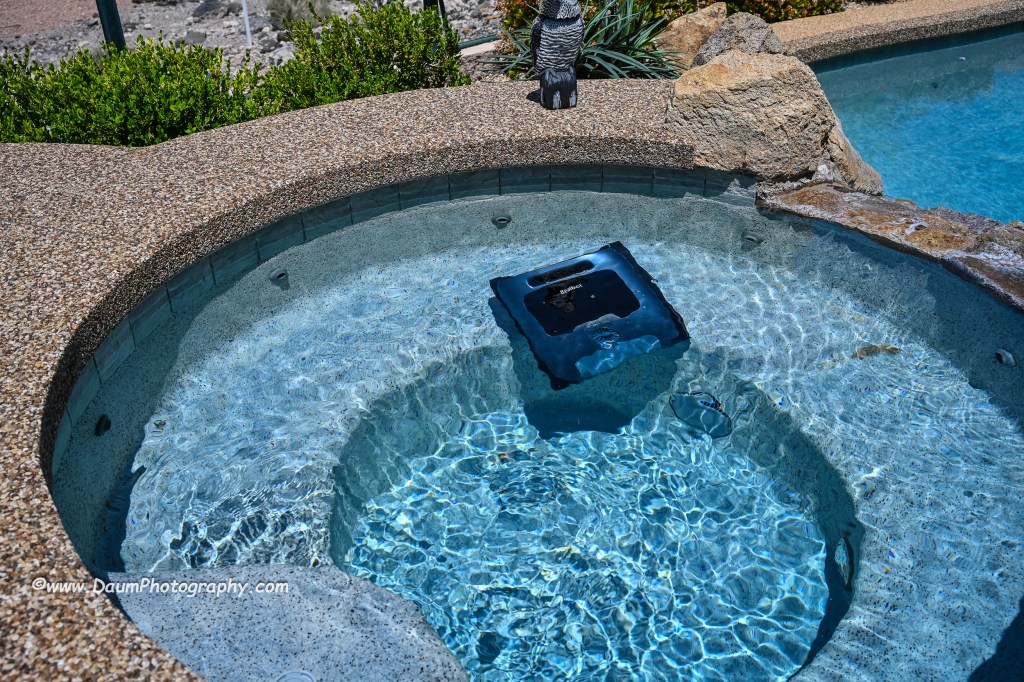
After the robot is finished cleaning, it will bring itself to the edge of the pool and hover there (unless you selected ECO mode) and send you a message via the app.  If you don’t retrieve it for an extended period, it will drop to the pool floor and you will need to use the retrieval hook to bring it back up.  The manual recommends that you slowly remove the Beatbot AquaSense Pro from your pool to allow it to self-drain as you pull it up.  Then you pop open the filter baskets cover and remove them for cleaning using a hose.  When that is done, you can put it onto the charger stand or in my case, move it into our hot tub for it to clean.  It easily cleaned both my pool and the hot tub on a single charge with battery power remaining once done.  It took about 3 to 3 ½ hours for the pool and under 1 ½ to 2 hours for the hot tub on different runs completed during my initial testing. It is virtually silent while cleaning unless it was at the surface where you could hear the water being expelled at a relatively low db level.

Preliminary Results

So, let’s turn to my initial set of questions: How did it handle my free form pool?  In a word- easily!  It had no problem with the fact that it was irregular in shape with curved walls.  The only impact was that the app when the cleaning was finished stated it automatically switched to DeepSense Mode for better cleaning and did not provide a clear graphic of the path it took to do it.  Did it do a good job cleaning?  We live in a dry desert climate so often there are blowing sand and dirt that get into the pool.  I was truly amazed at the amount of sand the Beatbot AquaSense Pro vacuumed up and how noticeably cleaner the bottom of the pool looked compared to just the normal pool filtration system and having the pool manually cleaned once a week. 

Similarly, it did a great job capturing leaves and debris both on the pool bottom and floating on the pool surface. 

Do I think this is something a pool owner would really want or is it just a neat robot?  I think the list price of $2,199 will deter many potential buyers until they see it in action or know someone who has one.  If you pay someone to clean your pool frequently, the Beatbot AquaSense Pro will pay for itself in your first year of ownership.  If you clean your pool yourself, you need to weigh your time and the quality of the job you do versus the ease of having Beatbot AquaSense Pro doing it for you.

If you would like to see a short video of the Beatbot AquaSense Pro in action, click on this link https://youtu.be/k1gVOMtEDKk

Summary

I am extremely impressed with Beatbot AquaSense Pro design and execution.  Lots of pool vacuums and some robots can do a good job on the floor of a pool, but to be able to climb the walls, stairs and landings, and scrub the waterline truly separates Beatbot AquaSense Pro from the field.  It is so easy to use and clean and the results are sparkling, both in the pool and hot tub.  The app is well designed and works every time.  I did not get the optional Clarifying Agent Kit so I can’t speak to its effectiveness.  Since the app has not given any information on water quality, I presume that is dependent on having the Kit installed.  The only hitch experienced so far is that the MemoryPark™ smart return doesn’t always bring the unit back to the starting point, but it always hovers near the wall, so it is easy to retrieve.

Conclusion, I rate Beatbot AquaSense Pro 5 out of a possible 5 waves!

Thanks for visiting and reading. If you have a question, please feel free to ask below! 

BlackVue DR970X-2CH Plus and DR970X-2CH LTE Plus Dash Cameras Field Test

By Jeff Daum, Ph.D., PPA

The focus (yes, literally and figuratively 😊 ) of this review is a comparison of two new BlackVue dash cameras, DR970X-2CH Plus and DR970X-2CH LTE Plus, to my current benchmark, the BlackVue DR900S-2CH camera unit.  I reviewed the DR900S in 2020 and found it to be an excellent choice out of the already crowded field of dashcams.  You can see my review here https://insight.daumphotography.com/2020/07/11/product-review-blackvue-dr900s-2ch-field-test/ .  The new DR970X Plus units were provided to me by the Marketing Team of Pittasoft Company, who manufactures the BlackVue units in their own factory in Korea.

Technically speaking based on BlackVue press releases, the DR970X Plus appears to have several improvements over the DR900S including a faster processor chip, improved CMOS sensors, and in the case of the DR970X-2CH LTE Plus, built in SIM card capability.   Top of my interest in carrying out this comparison and review is the DR970X Plus noticeably better in actual day-to-day use?

Before jumping into the field results, here are some of the respective technical specifications.

Physical dimensions:

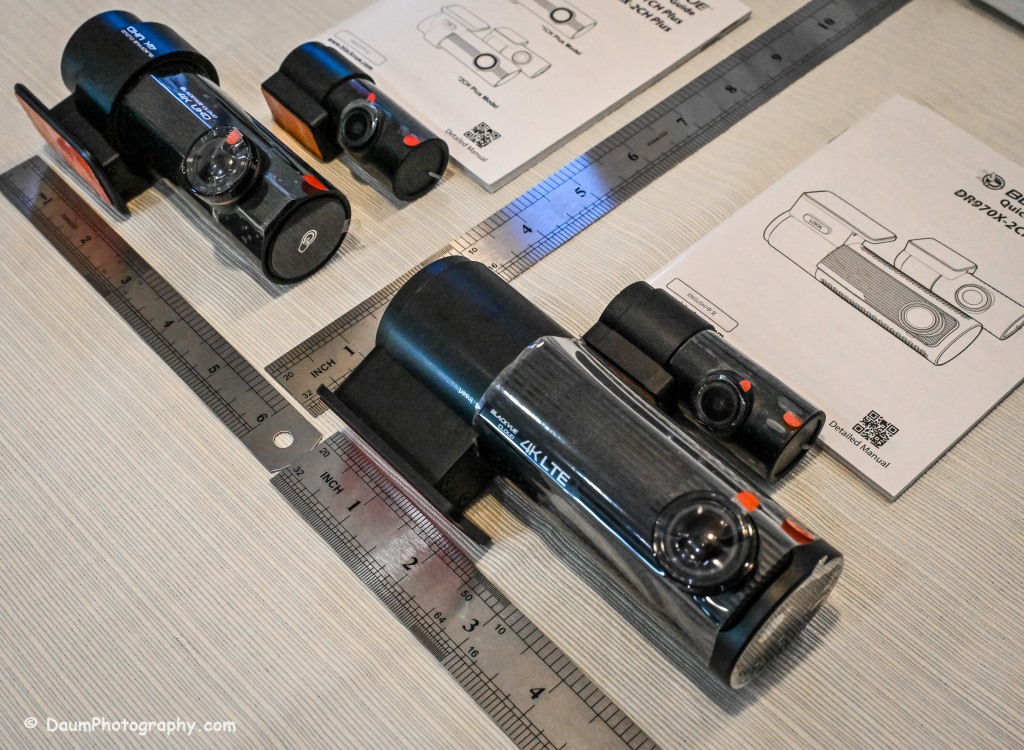
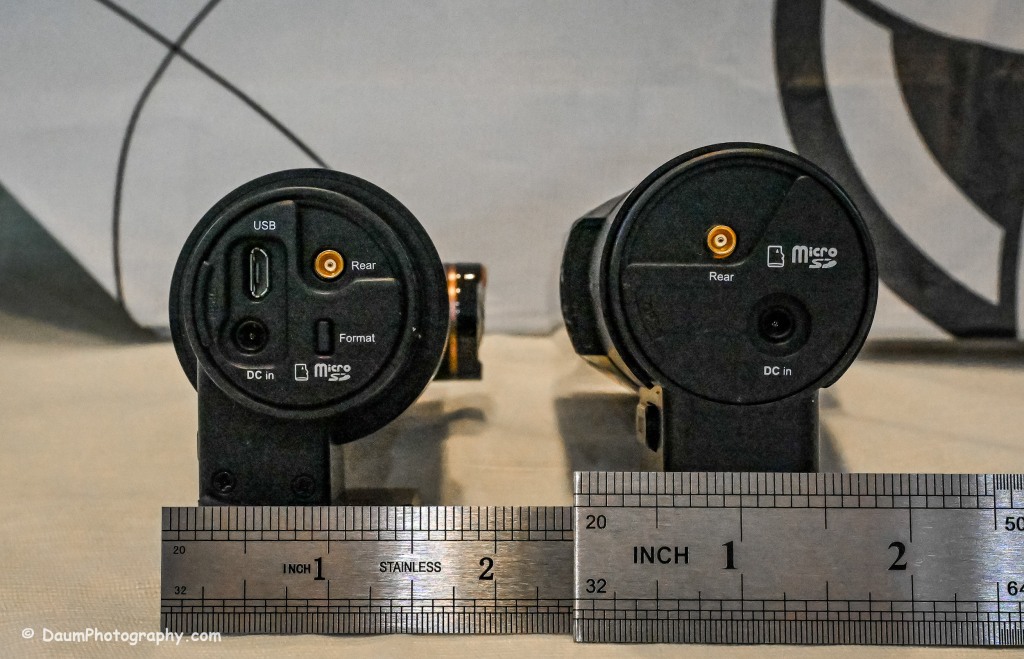
The DR970X-2CH Plus and DR970X-2CH LTE Plus have identical core components, that is, the lens, sensor, chips, etc., with the exception that the DR970X-2CH LTE Plus has a built-in LTE SIM micro card receiver and related circuitry.  This results in the DR970X-2CH LTE Plus being a little larger and slightly heavier than the sister unit.

DR970X-2CH LTE Plus vs DR970X-2CH Plus vs DR900S:

  -Weight with mount: 6.8 oz (192.7g) vs 5 oz (141.7g) vs 4 oz (113.39g)

  -Dimension: 5.42in (137.6mm) L x 2.67in (60.3mm) W x 1.69in (43mm) H vs 4.67in (118.6mm) L x 1.86in (47.7mm) W x 1.4 (36mm) H vs 4.66in (118.5mm) L x 1.4in (36mm) H

The rear camera is essentially physically the same on all three models: 2.6in (66mm) L x 1.1in (27.94mm) D and 1.0 oz (28.35g)

The DR970X Plus and the DR900S are almost the same physical size and weight, with the DR970X-2CH LTE being almost 2 ounces (56g) heavier as well as somewhat longer and rounder than the other two.

The lenses:

The DR970X-2CH Plus cameras (remember, both units are identical with respect to cameras and image capture) have a 125-degree horizontal and 68-degree vertical lens in the front unit, with a 107-degree horizontal and 55-degree vertical viewing angle in the back camera.  The DR900S-2CH camera has a slightly wider capture with a 136-degree horizontal and 77-degree vertical lens in the front unit, with a 116-degree horizontal and 61-degree vertical viewing angle in the back camera.

The resolutions and frame rates are identical for all three units at their highest settings: 3840×2160 @ 30 fps.

Image quality for the DR970X-2CH Plus units is 60+10 Mbps at the highest setting vs the DR900S is 25+10 Mbps, and all three have the same 8+6 Mbps with quality set to Normal.

Compression Codec is the same on all three units: H.265 (HEVC), H.264 (AVC)

Additional technology:

The DR970X-2CH Plus cameras use a STARVIS 2 CMOS Sensor of approximately 8.4 Megapixels on the front camera and a STARVIS CMOS Sensor or approximately 2.1 Megapixels on the rear camera, while the DR900S uses an 8-Megapixel CMOS Sensor on the front camera, and a Sony STARVIS CMOS Sensor of approximate 2 Megapixels on the rear camera.

All three cameras record in 4k UHD front and full HD rear.

All three camera units have built-in GPS but the DR970X Plus has dual band GPS, GLONASS.  They also have built-in WiFi with the DR900 supporting 802.11 2.4 GHz and 802.11 ac 5GHz dual band while the DR970X supports 802.11 a.b.g.n.ac.

All three record automatically when powered up and automatically over-write Normal recordings when the microSD card is full.  They also record and preserve impact detection events that occur while driving and while in parking mode (if powered).  Manual recording is also preserved.  They can take microSD cards from 16GB to 256GB (but strongly recommend only using BlackVue cards- more on this later).  Power is retained for a short period after shut down via built-in Super Capacitors.

All three cameras have a built-in microphone and speaker. One or both can be turned off via the BlackVue app.

All three camera units offer video recording saving to the cloud using optional paid plans, and the DR970X-2CH LTE Plus includes a free one-month trial SIM card and optional paid plans.  However, you don’t have to use the cloud and can either view your saved videos or live images by means of the free BlackVue phone app.  You can also download to your phone or remove the microSD card and transfer the files.  More on this shortly.

Power consumption per hour (really only important if you are using a dashcam in Parking Mode with the engine turned off) as expected, highest for the DR970X-2CH LTE being 590mA/12V in Normal Mode, 430mA/12V in Parking Mode vs the DR970X-2CH Plus at 480mA/12V Normal Mode, 370mA/12V Parking Mode vs the DR900S 380mA/12V in Normal Mode (Parking Mode was not part of the DR900S, so no equivalent power consumption available)

Recorded file size:  The typical DR970X Plus series front camera file size per recording (each is 1 minute in length) is 443 MB and for the rear camera 79.7 MB, while the DR900S file size per recording (1 minute in length) is 188 MB and for the rear camera 81.1 MB.  So, the DR970X Plus files for the front camera are more than 2.3 times larger than the DR900S, while the rear camera files are close in size.  This means that your microSD card is going to hold less than half the videos before it starts over writing as compared to the DR900S.

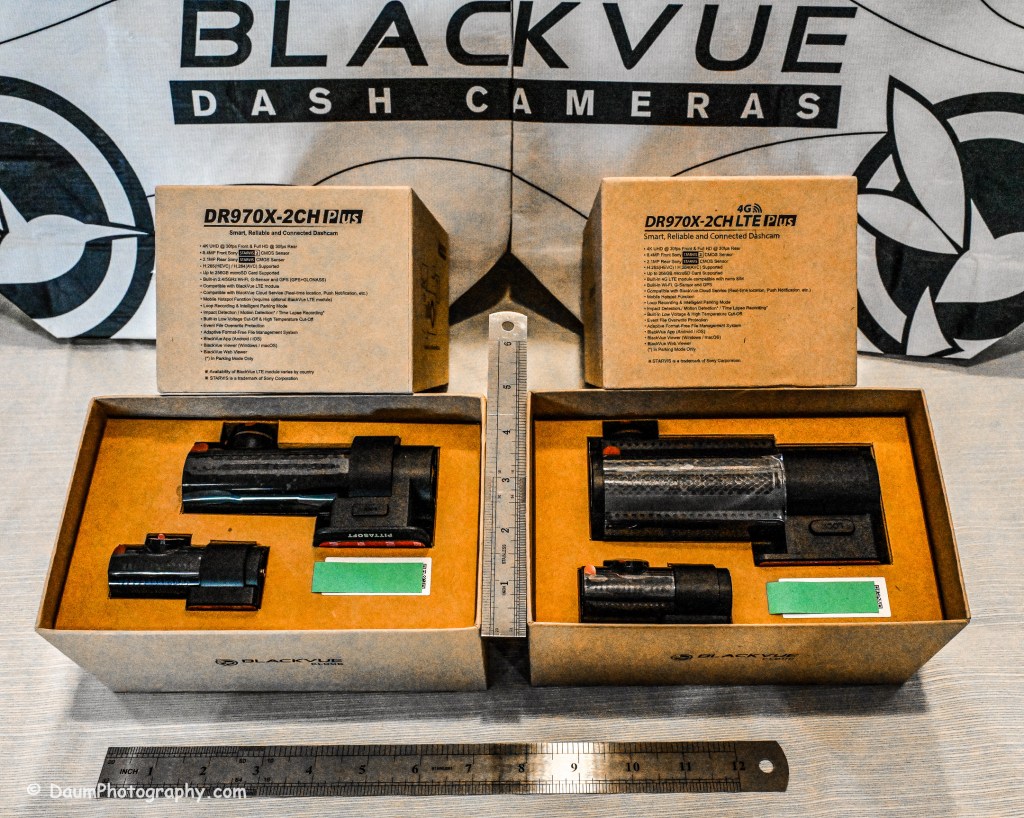
All come boxed with everything you need for either accessory plug powering or hard wire powering (both sets of power cords included), a starter BlackVue microSD card, connector line for linking and powering the rear camera, plastic trim pry tool, 3M adhesive for the cameras, small self-adhesive wire holders, Quick Start Guidebooks and a set of ‘nifty’ BlackVue stickers.  In my experience, the supplied power lines (hardwire or accessory, and rear camera) are more than adequate for proper setup in most vehicles.

Here is what the unboxing and components look like:

Preliminary Field-Testing Results

Though I will not cover permanent mounting in this review, it is fairly straightforward.  Running and tucking (hiding) the wiring needs some patience and varies from the OEM and type of your vehicle.  For an example you can check out my install in a BMW X3 here https://insight.daumphotography.com/2020/02/19/blackvue-dr900s-2ch-dash-cameras-install/ .   I will be doing a hardwire installation within a few months in a couple of different vehicles- a BMW i4 and a Chevrolet Corvette.  A link will be provided to that when available.  While these cameras all (the DR900S needs the optional Parking accessory wiring component) support automatic switch over to ‘Parking’ recording when hardwired, many vehicles today have battery management software built-in that will either cut the power to the dashcam or cut other non-essential power draws when the vehicle is turned off and the draw exceeds a certain level, to ensure the main battery has sufficient power remaining to start the engine.  You can buy optional battery packs to power a dashcam for a specified amount of time, typically from a few hours to a few days by piggybacking them per manufacturer’s directions.  BlackVue sells them for their cameras as do other organizations.  Currently these battery packs add considerable cost especially if you are looking for several days of parking coverage.  Beyond that, long term parking will require the auxiliary battery packs get recharged either by removing them to charge them or by a solar panel placed in the windshield if feasible.

The videos (MP4) can be viewed and/or downloaded through the excellent (and free) BlackVue app, or you can remove the microSD card and load the files onto your computer.  Again, BlackVue has an excellent app for either PCs or Apple (I will discuss it shortly).  For this review I removed the respective microSD cards and transferred the videos to my PC.  All video captures and still images presented here are not retouched or corrected and appear as recorded.  In some examples I have enlarged or cropped images for easier evaluation.

As I stated in my earlier dash camera review, for most dashcam users, the primary purpose is to document traffic as you are driving.  Dashcams have become popular as a means of providing evidence in the event of road rage and/or an accident.  Ideally the dashcam will capture clear, time and gps marked images, both during daytime and nighttime driving to aid in this objective.  To begin evaluating how well these BlackVue cameras achieve this, let’s first look at a short comparison between the DR970X Plus and the DR900S.

A couple of observations- both BlackVues do well in documenting what is happening. To my eye, the DR900S images are slightly sharper during the day than the DR970X, while the opposite is true of the nighttime images.  This is probably a result of the new STARVIS 2 CMOS Sensor in the DR970X.  I should mention that Pittasoft has indicated a firmware update is planned for the DR970X series, while I don’t know what it will fix, perhaps focus refinement will be part of it.

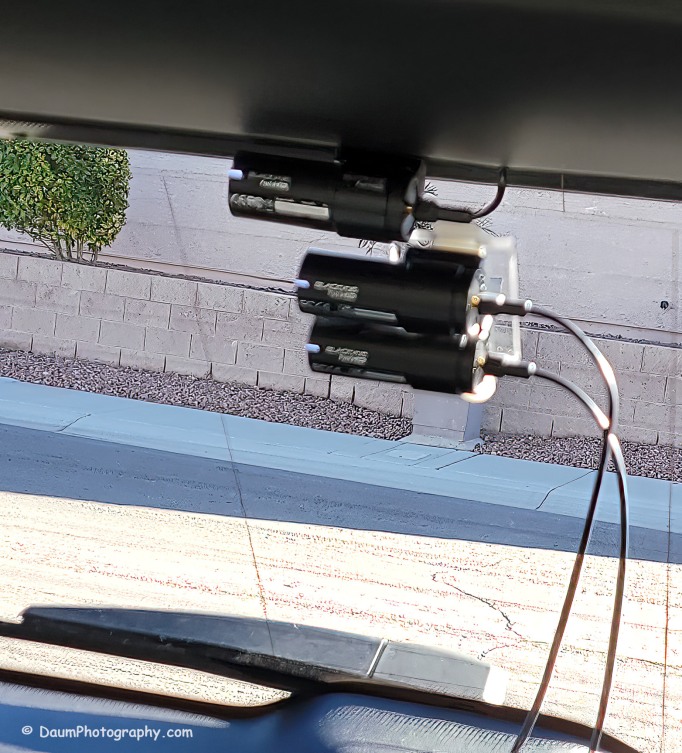
You might be wondering what is in the right side of the DR900S.  That is actually the bracket supporting the two DR970X cameras mounted below. Here is the set up I used:

Here are comparisons between the DR970X Plus and DR900S where you can see both the respective front and rear facing camera views, one day time and one nighttime set:

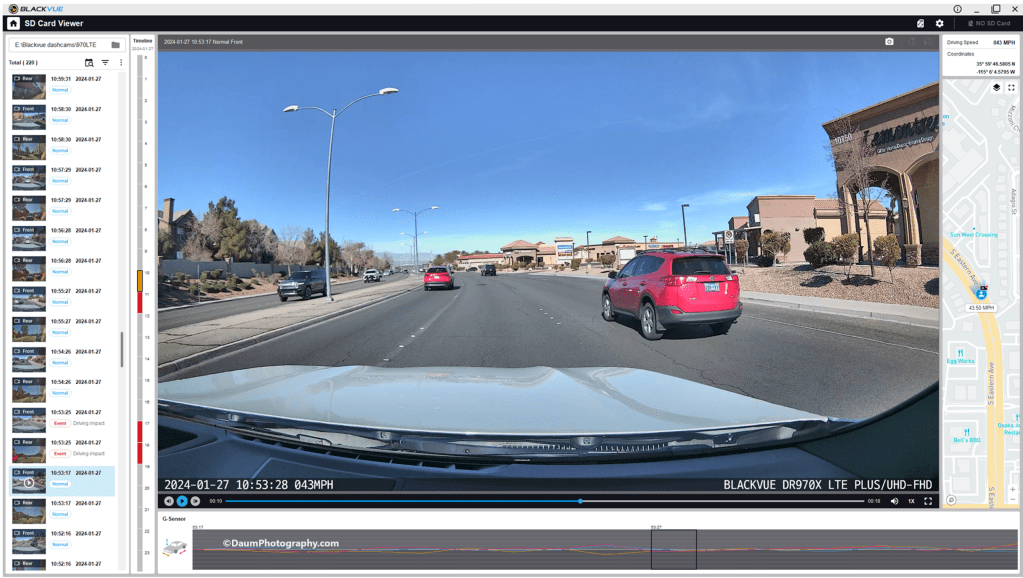
By the way, those simultaneous front and back views were generated using the free BlackVue PC app.  It is a very easy to use application that also can show each video along with a GPS location on a dynamic map, as well as a g sensor graph.  The g sensor shows any impact or bumps/rough road (which will also result in the video getting an “Impact” vs “Normal” label.  Here is what it looks like:

Here are some still images with the DR900S on the left and DR970X on the right:

Front camera

Rear camera

As with the videos, the greatest difference between the DR900S and DR970X is in the nighttime comparisons.  All images are viable straight from the respective cameras and could, if necessary, be sharpened with editing software.  One real advantage of the DR970X Plus series is that the WiFi is always on and that allows you to quickly view any saved or live images using the BlackVue app on your phone.  For the DR900S you have to turn on the WiFi at the front camera unit by pressing a button until it turns on (and it will automatically turn off in a few minutes).  Once turned on you can then link to the camera using the app.

Summary

As in prior comparisons, BlackVue continues to produce top line dashcams with the most important features built in.  Of course, quality does come at a price with the DR970X 2CH Plus including a 64GB microSD card retailing at US$474.99 and the DR970X LTE 2CH Plus including a 64GB microSD card, SIM card with a free trial of 1GB for one month retailing at US$544.99.  The BlackVue DR900S has been in my vehicle for four years now and has performed flawlessly in all temperatures from freezing to extreme desert heat. I have no reason to think the new DR970X Plus series won’t perform equally well. 

BlackVue states that you should use their microSD cards for optimal performance. I did experiment early on with several non-BlackVue microSD cards (all were name brand high-quality professional level cards, designed specifically for handling the frequent record events typical of security cameras designed for video recording), and while they would work for a period, inevitably they would stop working or have glitches.  Once I went back to BlackVue’s own card I never had it stop working or fail.

These cameras offer pricing plans for saving files to the cloud as well as in the case of the DR970X Plus LTE, a built-in SIM card to simplify the recording directly to the cloud.  As noted, it is easy to either download the video files or temporarily remove the microSD card and transfer the files to your computer.

The fit and finish of the new DR970X Plus is excellent (as was the DR900S) and all the included components are high quality.

If you are highly concerned about your vehicle when it is parked and unattended, you should consider purchasing optional battery packs to power the dashcam when the engine is off. One option is BlackVue’s Power Magic Battery Pack (US$159). It is designed for plugging into your accessory outlet and in turn your dashcam.  It provides about 12 hours of front camera recording or about 7.6 hours of front and rear camera recording.

A second option is to purchase Blackvue’s Power Magic Ultra Battery (US$389.99).  It is designed for either accessory plug or hardwire installation and then connection to your dashcam.  The Ultra unit is a high-capacity rechargeable unit that provides about 30 hours of record time for just the front camera, or about 19 hours record time with both front and back camera recording and can be piggy-backed to increase the total record time while parked.

Final thoughts:  Many of my readers have asked ‘Do you really need a dashcam, and if so which one?”  Hopefully this review is helpful in reaching a decision.  For me personally I always want to have documentation of what is going on around my vehicle when I am driving, so all my cars have dashcams and when I rent a car, I put in a portable dashcam before I leave the lot.  I also find it is nice to have videos of scenic drives and the ones from BlackVue are perfect for this.

Thanks for visiting and reading. If you have a question, please feel free to ask below! 

InSight© Product Reviews

A bit of background:

P1010884I have always been inquisitive of how things worked, coupled with a high level of mechanical ability.  Over the years, friends have frequently relied on my research and evaluations to help them with product decisions.  Several encouraged me to share my write-ups in the ‘public’ arena.

I am adding a new section to my blog which will include practical product reviews.

No compensation is received for any of my reviews.  When I started this, and published reviews, the items were purchased directly by me. Of late, most products have been provided at no charge by the manufacturer to me for review.

When possible, I try to compare and review comparable products since I think this provides a better benchmark.

If you have questions about one of my reviews, please use the contact form to reach me.  You will also find an area for commenting following each review.  I look forward to hearing from you and hope, where applicable, the information will assist you in making purchasing decisions.

Thanks for stopping by!

The first review Dash Cameras with Navigation: The evolution of Man’s need for direction & documentation http://wp.me/p81CBz-99

Here is a review of a car battery charger/maintainer:  “You’ll get a charge out of this.https://insight.daumphotography.com/2018/11/11/youll-get-a-charge-out-of-this/

Here is a review of products to assist in detailing and wrenching: https://insight.daumphotography.com/2019/03/23/product-review-detailing-and-wrenching-aids/

Here is a review of the step-by-step installation of the BlackVue DR900S-2CH install https://insight.daumphotography.com/?p=989

This is a review of an innovative Bluetooth ear bud producct https://insight.daumphotography.com/2020/02/25/aipower-wearbuds-review/