While I was at CES 2024 (Consumer Electronics Show) in Las Vegas, Nevada last month I attended the JETRO (Japan External Trade Organization) session. One of the demonstrations was both at the same time incredibly simple yet producing an almost unbelievable outcome. It was put on by Sound Fun Corporation of Japan demonstrating the technology behind their new Mirai Speaker. In essence they developed and patented the AudibleWave™ Technology used in the Mirai that helps produce clear dialog from televisions. Based on some initial research by a university professor that found elderly individuals could hear music more easily when it was played through an old style gramophone, they spent years perfecting how to curve sound when projected from speakers so that it can be more easily heard and understood. The demonstration was done using just his unamplified voice either behind a straight piece of plastic sheet or curving the same sheet, so it bowed out in the center towards us. When he spoke through the straight sheet it was hard to clearly hear him, however, when he curved the sheet, you could easily hear and understand what he was saying.
Here is a similar demonstration from Sound Fun’s website.
Courtesy Sound Fun Corporation
This was intriguing to say the least. So, when their team offered a Mirai Speaker unit to review I jumped at the opportunity.
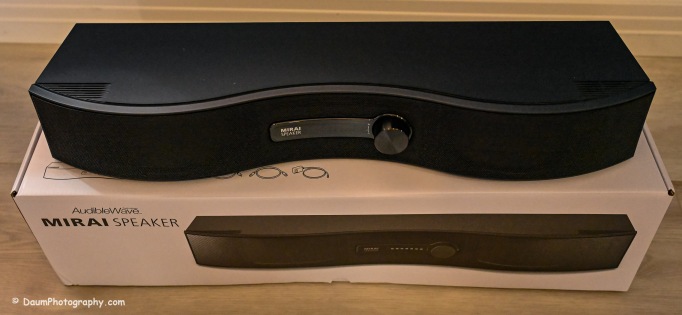
Here is what the Mirai Speaker looks like as unboxed:
The Mirai Speaker is very well made and finished. The unit weighs 3 lbs. 10.6 oz/1.6625kg and is 21” W x 6” D (at its widest point) x 3.5”H/542mmW x 160mmD x 87mmH. It was designed and developed in Japan and manufactured in Vietnam. It retails for US$299. The unit is well packaged and comes with everything you need to set it up and start using it including a remote with two AA batteries, two means of connecting it to the sound source: Optical cable or analog audio cable, AC power supply and instruction pamphlet.
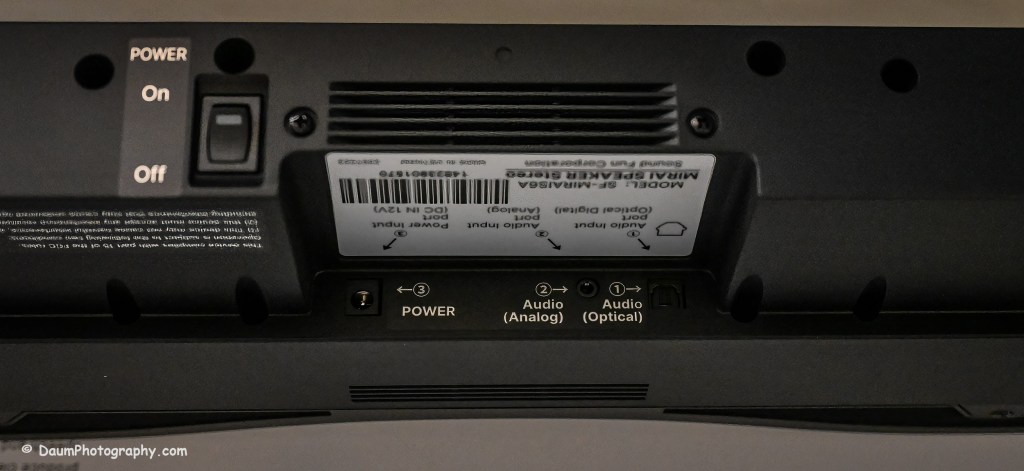
It is primarily intended to be connected to a television using either the optical output or analog output connection. In addition, the unit needs to have its small power adapter plugged into an AC outlet. If you use the optical outlet, you have two ways you can listen to the television. You can use just the Mirai Speaker system or use a balance between the television and the Mirai Speaker. If you use the analog outlet, you cannot use both simultaneously.
Initial Impressions
The setup was straight forward and easy. Even though the instruction pamphlet states it may take a few days to notice a real difference when using the Mirai Speaker, the effect of their AudibleWave™ Technology was immediately apparent in doing comparisons of just television speakers versus just the Mirai Speaker. It wasn’t louder but was a cleaner, clearer sound with respect to any dialog. It will take some time to refine the balance between the regular speakers and the Mirai Speaker for the best overall sound for example, in watching a movie.
So, in a word does it work? Yes. I believe this would be a nice reasonably priced addition, when you have one or more individuals in your home with some hearing loss normally associated with aging. I plan on doing more testing and also trying it incorporated into a full surround sound system set up. Stay tuned!
The focus (yes, literally and figuratively 😊 ) of this review is a comparison of two new BlackVue dash cameras, DR970X-2CH Plus and DR970X-2CH LTE Plus, to my current benchmark, the BlackVue DR900S-2CH camera unit. I reviewed the DR900S in 2020 and found it to be an excellent choice out of the already crowded field of dashcams. You can see my review here https://insight.daumphotography.com/2020/07/11/product-review-blackvue-dr900s-2ch-field-test/ . The new DR970X Plus units were provided to me by the Marketing Team of Pittasoft Company, who manufactures the BlackVue units in their own factory in Korea.
Technically speaking based on BlackVue press releases, the DR970X Plus appears to have several improvements over the DR900S including a faster processor chip, improved CMOS sensors, and in the case of the DR970X-2CH LTE Plus, built in SIM card capability. Top of my interest in carrying out this comparison and review is the DR970X Plus noticeably better in actual day-to-day use?
Before jumping into the field results, here are some of the respective technical specifications.
Physical dimensions:
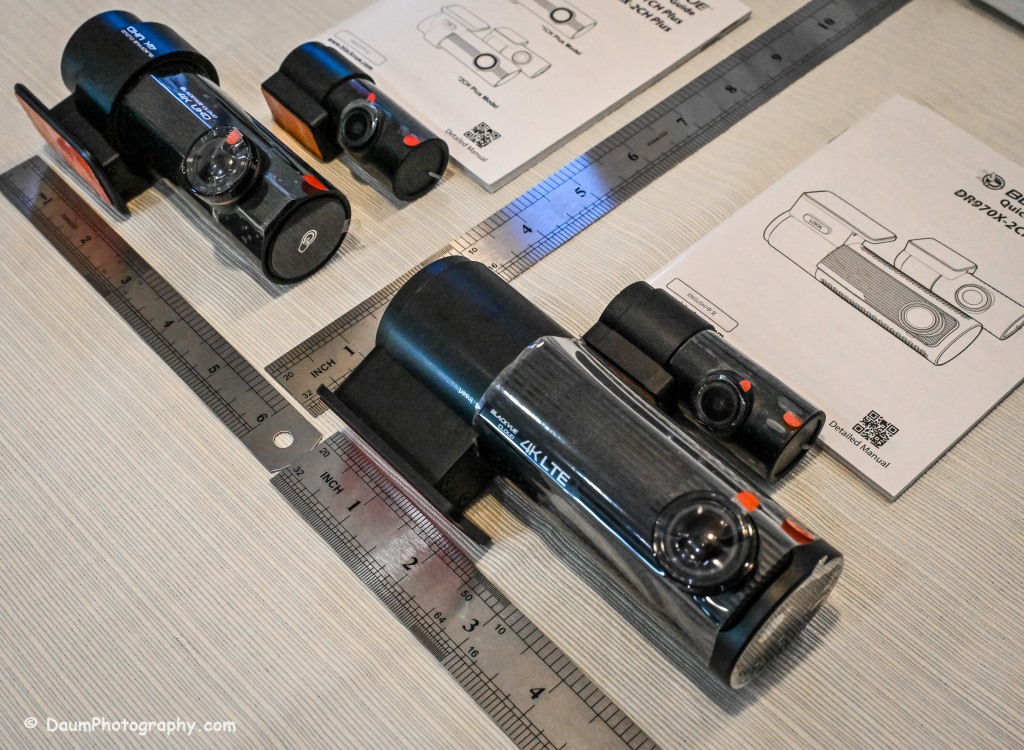
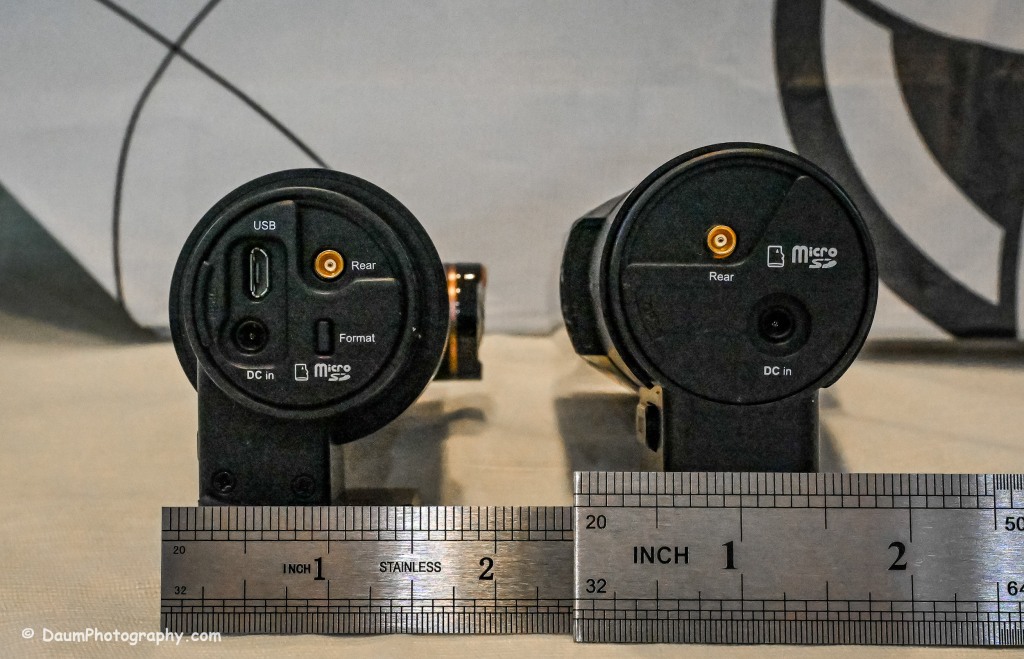
The DR970X-2CH Plus and DR970X-2CH LTE Plus have identical core components, that is, the lens, sensor, chips, etc., with the exception that the DR970X-2CH LTE Plus has a built-in LTE SIM micro card receiver and related circuitry. This results in the DR970X-2CH LTE Plus being a little larger and slightly heavier than the sister unit.
DR970X-2CH LTE Plus vs DR970X-2CH Plus vs DR900S:
-Weight with mount: 6.8 oz (192.7g) vs 5 oz (141.7g) vs 4 oz (113.39g)
-Dimension: 5.42in (137.6mm) L x 2.67in (60.3mm) W x 1.69in (43mm) H vs 4.67in (118.6mm) L x 1.86in (47.7mm) W x 1.4 (36mm) H vs 4.66in (118.5mm) L x 1.4in (36mm) H
The rear camera is essentially physically the same on all three models: 2.6in (66mm) L x 1.1in (27.94mm) D and 1.0 oz (28.35g)
The DR970X Plus and the DR900S are almost the same physical size and weight, with the DR970X-2CH LTE being almost 2 ounces (56g) heavier as well as somewhat longer and rounder than the other two.
The lenses:
The DR970X-2CH Plus cameras (remember, both units are identical with respect to cameras and image capture) have a 125-degree horizontal and 68-degree vertical lens in the front unit, with a 107-degree horizontal and 55-degree vertical viewing angle in the back camera. The DR900S-2CH camera has a slightly wider capture with a 136-degree horizontal and 77-degree vertical lens in the front unit, with a 116-degree horizontal and 61-degree vertical viewing angle in the back camera.
The resolutions and frame rates are identical for all three units at their highest settings: 3840×2160 @ 30 fps.
Image quality for the DR970X-2CH Plus units is 60+10 Mbps at the highest setting vs the DR900S is 25+10 Mbps, and all three have the same 8+6 Mbps with quality set to Normal.
Compression Codec is the same on all three units: H.265 (HEVC), H.264 (AVC)
Additional technology:
The DR970X-2CH Plus cameras use a STARVIS 2 CMOS Sensor of approximately 8.4 Megapixels on the front camera and a STARVIS CMOS Sensor or approximately 2.1 Megapixels on the rear camera, while the DR900S uses an 8-Megapixel CMOS Sensor on the front camera, and a Sony STARVIS CMOS Sensor of approximate 2 Megapixels on the rear camera.
All three cameras record in 4k UHD front and full HD rear.
All three camera units have built-in GPS but the DR970X Plus has dual band GPS, GLONASS. They also have built-in WiFi with the DR900 supporting 802.11 2.4 GHz and 802.11 ac 5GHz dual band while the DR970X supports 802.11 a.b.g.n.ac.
All three record automatically when powered up and automatically over-write Normal recordings when the microSD card is full. They also record and preserve impact detection events that occur while driving and while in parking mode (if powered). Manual recording is also preserved. They can take microSD cards from 16GB to 256GB (but strongly recommend only using BlackVue cards- more on this later). Power is retained for a short period after shut down via built-in Super Capacitors.
All three cameras have a built-in microphone and speaker. One or both can be turned off via the BlackVue app.
All three camera units offer video recording saving to the cloud using optional paid plans, and the DR970X-2CH LTE Plus includes a free one-month trial SIM card and optional paid plans. However, you don’t have to use the cloud and can either view your saved videos or live images by means of the free BlackVue phone app. You can also download to your phone or remove the microSD card and transfer the files. More on this shortly.
Power consumption per hour (really only important if you are using a dashcam in Parking Mode with the engine turned off) as expected, highest for the DR970X-2CH LTE being 590mA/12V in Normal Mode, 430mA/12V in Parking Mode vs the DR970X-2CH Plus at 480mA/12V Normal Mode, 370mA/12V Parking Mode vs the DR900S 380mA/12V in Normal Mode (Parking Mode was not part of the DR900S, so no equivalent power consumption available)
Recorded file size: The typical DR970X Plus series front camera file size per recording (each is 1 minute in length) is 443 MB and for the rear camera 79.7 MB, while the DR900S file size per recording (1 minute in length) is 188 MB and for the rear camera 81.1 MB. So, the DR970X Plus files for the front camera are more than 2.3 times larger than the DR900S, while the rear camera files are close in size. This means that your microSD card is going to hold less than half the videos before it starts over writing as compared to the DR900S.
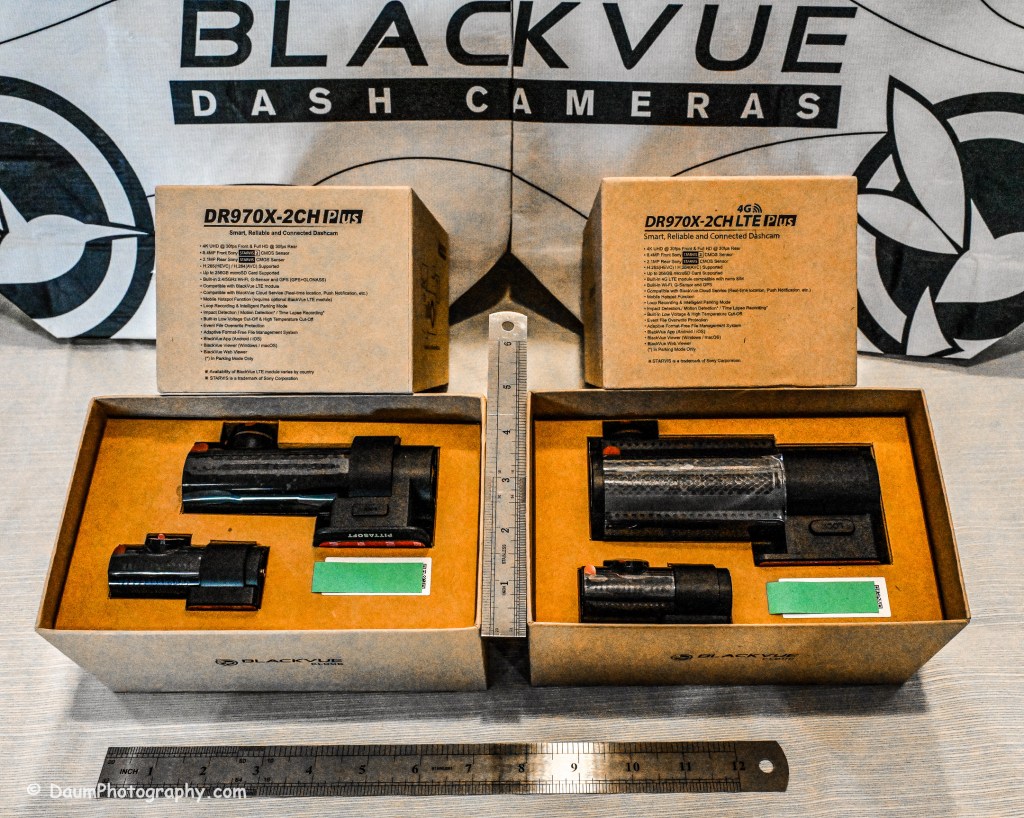
All come boxed with everything you need for either accessory plug powering or hard wire powering (both sets of power cords included), a starter BlackVue microSD card, connector line for linking and powering the rear camera, plastic trim pry tool, 3M adhesive for the cameras, small self-adhesive wire holders, Quick Start Guidebooks and a set of ‘nifty’ BlackVue stickers. In my experience, the supplied power lines (hardwire or accessory, and rear camera) are more than adequate for proper setup in most vehicles.
Here is what the unboxing and components look like:
Preliminary Field-Testing Results
Though I will not cover permanent mounting in this review, it is fairly straightforward. Running and tucking (hiding) the wiring needs some patience and varies from the OEM and type of your vehicle. For an example you can check out my install in a BMW X3 here https://insight.daumphotography.com/2020/02/19/blackvue-dr900s-2ch-dash-cameras-install/ . I will be doing a hardwire installation within a few months in a couple of different vehicles- a BMW i4 and a Chevrolet Corvette. A link will be provided to that when available. While these cameras all (the DR900S needs the optional Parking accessory wiring component) support automatic switch over to ‘Parking’ recording when hardwired, many vehicles today have battery management software built-in that will either cut the power to the dashcam or cut other non-essential power draws when the vehicle is turned off and the draw exceeds a certain level, to ensure the main battery has sufficient power remaining to start the engine. You can buy optional battery packs to power a dashcam for a specified amount of time, typically from a few hours to a few days by piggybacking them per manufacturer’s directions. BlackVue sells them for their cameras as do other organizations. Currently these battery packs add considerable cost especially if you are looking for several days of parking coverage. Beyond that, long term parking will require the auxiliary battery packs get recharged either by removing them to charge them or by a solar panel placed in the windshield if feasible.
The videos (MP4) can be viewed and/or downloaded through the excellent (and free) BlackVue app, or you can remove the microSD card and load the files onto your computer. Again, BlackVue has an excellent app for either PCs or Apple (I will discuss it shortly). For this review I removed the respective microSD cards and transferred the videos to my PC. All video captures and still images presented here are not retouched or corrected and appear as recorded. In some examples I have enlarged or cropped images for easier evaluation.
As I stated in my earlier dash camera review, for most dashcam users, the primary purpose is to document traffic as you are driving. Dashcams have become popular as a means of providing evidence in the event of road rage and/or an accident. Ideally the dashcam will capture clear, time and gps marked images, both during daytime and nighttime driving to aid in this objective. To begin evaluating how well these BlackVue cameras achieve this, let’s first look at a short comparison between the DR970X Plus and the DR900S.
A couple of observations- both BlackVues do well in documenting what is happening. To my eye, the DR900S images are slightly sharper during the day than the DR970X, while the opposite is true of the nighttime images. This is probably a result of the new STARVIS 2 CMOS Sensor in the DR970X. I should mention that Pittasoft has indicated a firmware update is planned for the DR970X series, while I don’t know what it will fix, perhaps focus refinement will be part of it.
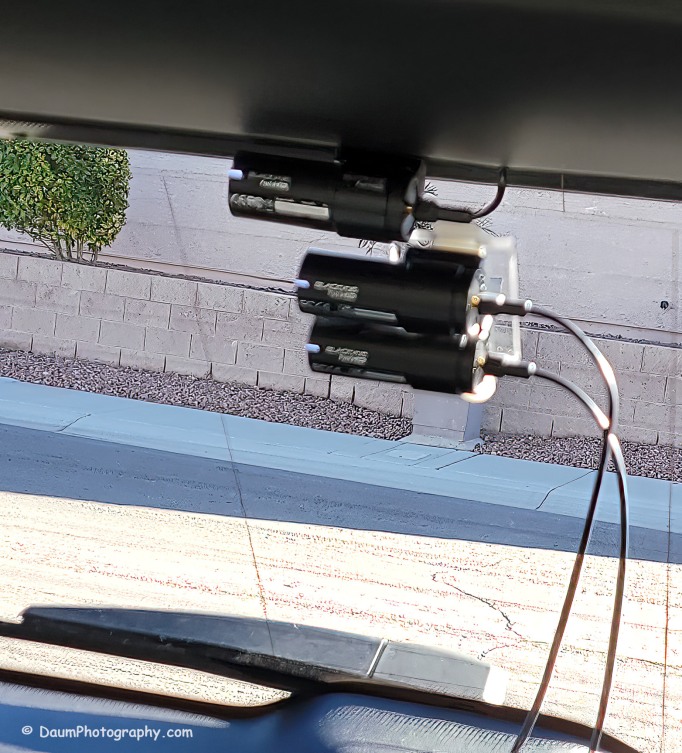
You might be wondering what is in the right side of the DR900S. That is actually the bracket supporting the two DR970X cameras mounted below. Here is the set up I used:
Here are comparisons between the DR970X Plus and DR900S where you can see both the respective front and rear facing camera views, one day time and one nighttime set:
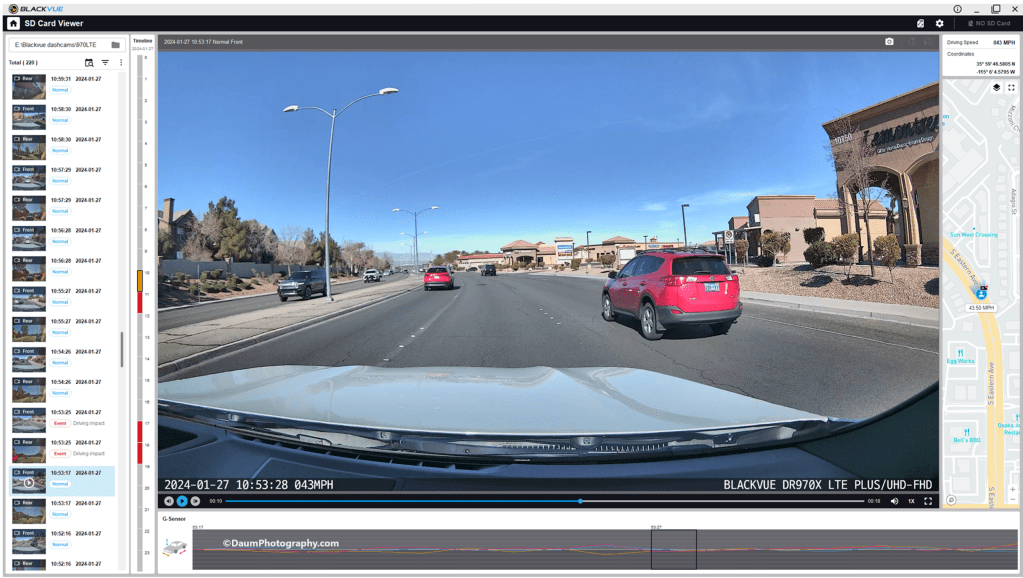
By the way, those simultaneous front and back views were generated using the free BlackVue PC app. It is a very easy to use application that also can show each video along with a GPS location on a dynamic map, as well as a g sensor graph. The g sensor shows any impact or bumps/rough road (which will also result in the video getting an “Impact” vs “Normal” label. Here is what it looks like:
Here are some still images with the DR900S on the left and DR970X on the right:
Front camera
Rear camera
As with the videos, the greatest difference between the DR900S and DR970X is in the nighttime comparisons. All images are viable straight from the respective cameras and could, if necessary, be sharpened with editing software. One real advantage of the DR970X Plus series is that the WiFi is always on and that allows you to quickly view any saved or live images using the BlackVue app on your phone. For the DR900S you have to turn on the WiFi at the front camera unit by pressing a button until it turns on (and it will automatically turn off in a few minutes). Once turned on you can then link to the camera using the app.
Summary
As in prior comparisons, BlackVue continues to produce top line dashcams with the most important features built in. Of course, quality does come at a price with the DR970X 2CH Plus including a 64GB microSD card retailing at US$474.99 and the DR970X LTE 2CH Plus including a 64GB microSD card, SIM card with a free trial of 1GB for one month retailing at US$544.99. The BlackVue DR900S has been in my vehicle for four years now and has performed flawlessly in all temperatures from freezing to extreme desert heat. I have no reason to think the new DR970X Plus series won’t perform equally well.
BlackVue states that you should use their microSD cards for optimal performance. I did experiment early on with several non-BlackVue microSD cards (all were name brand high-quality professional level cards, designed specifically for handling the frequent record events typical of security cameras designed for video recording), and while they would work for a period, inevitably they would stop working or have glitches. Once I went back to BlackVue’s own card I never had it stop working or fail.
These cameras offer pricing plans for saving files to the cloud as well as in the case of the DR970X Plus LTE, a built-in SIM card to simplify the recording directly to the cloud. As noted, it is easy to either download the video files or temporarily remove the microSD card and transfer the files to your computer.
The fit and finish of the new DR970X Plus is excellent (as was the DR900S) and all the included components are high quality.
If you are highly concerned about your vehicle when it is parked and unattended, you should consider purchasing optional battery packs to power the dashcam when the engine is off. One option is BlackVue’s Power Magic Battery Pack (US$159). It is designed for plugging into your accessory outlet and in turn your dashcam. It provides about 12 hours of front camera recording or about 7.6 hours of front and rear camera recording.
A second option is to purchase Blackvue’s Power Magic Ultra Battery (US$389.99). It is designed for either accessory plug or hardwire installation and then connection to your dashcam. The Ultra unit is a high-capacity rechargeable unit that provides about 30 hours of record time for just the front camera, or about 19 hours record time with both front and back camera recording and can be piggy-backed to increase the total record time while parked.
Final thoughts: Many of my readers have asked ‘Do you really need a dashcam, and if so which one?” Hopefully this review is helpful in reaching a decision. For me personally I always want to have documentation of what is going on around my vehicle when I am driving, so all my cars have dashcams and when I rent a car, I put in a portable dashcam before I leave the lot. I also find it is nice to have videos of scenic drives and the ones from BlackVue are perfect for this.
Thanks for visiting and reading. If you have a question, please feel free to ask below!
Probably the best way to start is to use CES’ clever one word campaign that defines CES 2017: Whoa!
Having spent 5+ days trying to take it all in, and by all I mean over 3,800 exhibiting companies, across several Las Vegas resort locations and the LV Convention Center, and is the largest event of its kind, I have to agree Whoa! best describes it.
If you are not familiar with CES, it used to be known as the Consumer Electronics Show, and now is called CES: the global consumer electronics and consumer technology trade show. While the new official name isn’t as ‘catchy’ as the original one, it is more accurate. Exhibitors and buyers from 150 plus countries attend, network, and place orders for this year’s hottest tech.
Additionally, it serves as a platform for the top experts in related fields and industries to come to share ideas and learn from one another. While it is not open to the public, it has a massive attendance- over 175,000 this year, along with a large media presence to get the word out.
CES 2017 covered a broad range of technology and its impact on:
Aging and accessibility
Cyber security
Drones (from micro to those capable of carrying an individual)
Enhanced audio and video
Gaming, VR and AR (virtual and augmented reality)
Health, fitness and wearables
The Connected world
Sustainable and Eco-friendly tech
Vehicle technology
Startups
Family and lifestyle
Content and entertainment
Robotics
The focus of this blog is one slice of CES 2017 which, in my opinion, will ultimately impact virtually everyone- that of Autonomous Vehicles. From my perspective, it truly reflects the synthesis and status of the technology found across most of the areas in the bullet list above.
Introduction: Just what is an autonomous vehicle?
Is it a car that can drive down the road by itself like a Tesla, or one that can park itself like a Toyota, or brake itself to avoid collision like a Cadillac, or is it reserved for something more like depicted in the 1960s series the Jetsons?
Courtesy of Newsday
At CES 2017 there were numerous autonomous vehicles in all shapes and sizes.
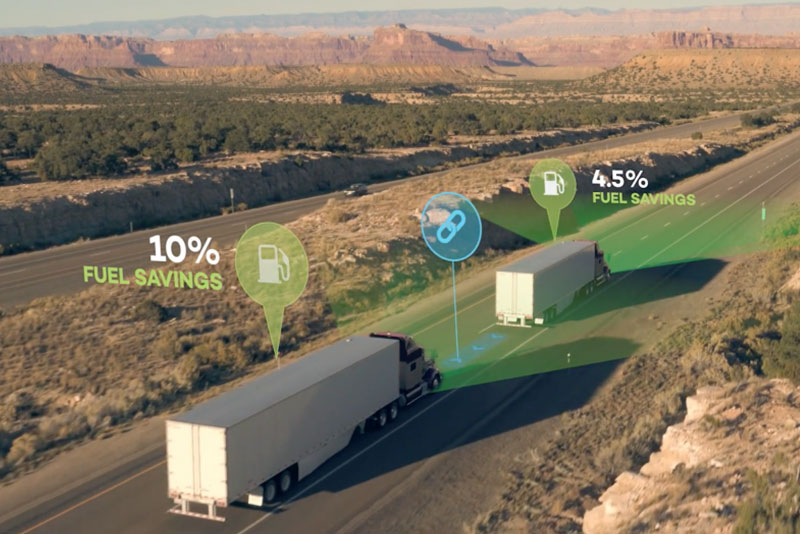
And there were even semi-autonomous trucks demonstrating platooning technology, where they are able to travel in a caravan fashion saving fuel and driver effort.
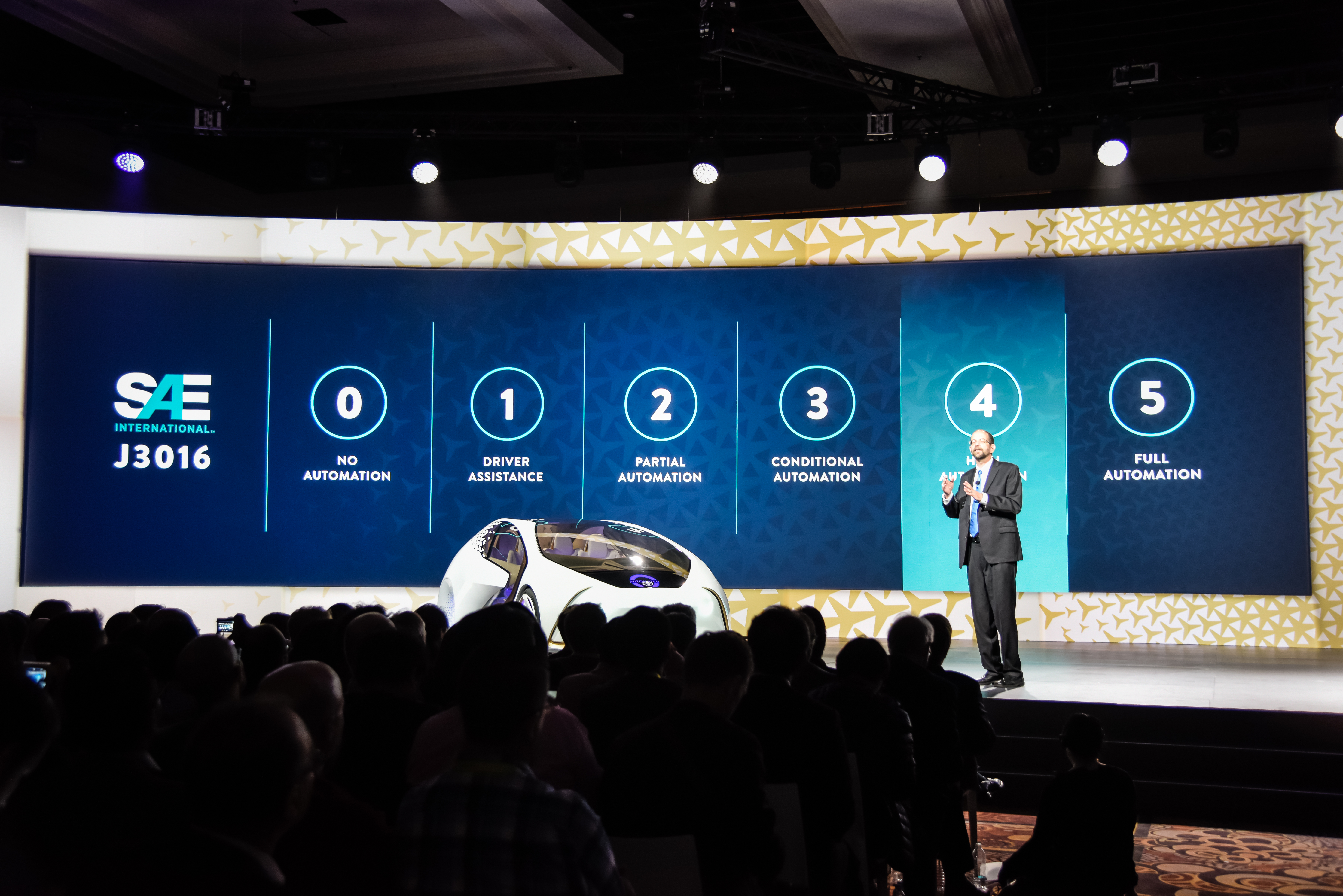
SAE has developed the most broadly accepted definition of the levels of driving automation. As seen on the accompanying chart, they have described five levels ranging from ‘no automation’ through ‘full automation.’ Most important is the transition role (responsibilities) between the human and the ‘system.’ The biggest shift is between levels 2 and 3, where the responsibility for monitoring the driving environment shifts from the person to the system. The role of the human becomes one of back-up to the automated driving system. Of course, this shift in responsibility is one of the thorniest and most complex components of the process.
Autonomous vehicles– the major potential ‘pros’:
Among the top reasons to move towards automation level 3, 4 or ultimately 5, include anticipated significant reductions in vehicular deaths; reduction in congestion; reduction in pollution; facilitated transport of individuals unable to or who should not be driving (too old, infirm, disabled, too young, under medically induced or other impairment).
For example, there are approximately 32,000 automotive related deaths per year. NHTSA has estimated that between 90 and 94% of those are due to human error. Further, the economic cost is c. $242 billion and societal harm c $836 billion. Automated drive systems, whether as low as SAE level 2 on upwards to 5, is expected to significantly reduce deaths due to human error. Most agree it is reasonable to expect automation to quickly reduce the automotive related deaths easily by half or more.
Damien Riehl (a technology lawyer with a background in legal software design) summed up the critical advantages of the ‘hand-off’ from human to machine: “Computers do not share human drivers’ foibles: They cannot be inebriated, they don’t text, and they don’t fall asleep. Automated-driving systems can also have super-human qualities: 360–degree vision; 100 percent alert time; constant communication with the road, traffic lights, and other cars; “sight” through fog and darkness; and universal, system-wide routing for traffic-flow optimization. Computers react faster: Humans’ reaction time is approximately 1.5 seconds, while computers’ reaction times are measured in milliseconds (and, per Moore’s Law, improving exponentially). [ from the Bench & Bar of Minnesota, the official publication of the Minnesota State Bar Association; Riehl Oct. 4, 2016]
Another significant advantage of moving towards autonomous vehicles comes from the necessary connectivity in each vehicle. Autonomous vehicles will need to be able to ‘communicate’ with other vehicles on the same road, the environmental variables such as traffic lights, weather, flow, etc. This critical inter-connectivity will enable aggregated, and most cases, instantaneous learning by the vehicle’s system. Much like we see today in applications such as WAZE and LIVE, where we as drivers hear of traffic issues, police actions, etc. in near real time, and they can choose to act upon such information, that is learn from it, or ignore it. But of course, the difference is that autonomous vehicles will be programmed with algorithms to instantaneously incorporate the new information and take appropriate corrective actions. For example, if an autonomous vehicle is driving along a road where there is a traffic accident or construction, it would send the information to other autonomous vehicles further back on the same route, resulting in a seamless rerouting. This built in collective and incremental learning will mean that the more the autonomous vehicles drive, the more of them on the road with vehicle-to-vehicle and vehicle-to-environs instant and continuous connections, the more efficient and expeditious each will become.
Potential applications abound (many you probably have heard about) including driverless pick up via Uber/Lyft; calling your own car to pick you up and drop you off; driverless public transportation like Olli; platooning of freight hauling trucks, etc. Autonomous vehicles also open up new modes of transportation, such as the hyperloop. For example, Hyperloop One is being built north of Las Vegas, Nevada as a proof of concept. Here in their own words is an explanation: “The Hyperloop is a new way to move people or things anywhere in the world quickly, safely, efficiently, on-demand and with minimal impact to the environment. The system accelerates a passenger or cargo vehicle through a steel tube in a near-vacuum using that linear electric motor. The autonomous vehicles glide comfortably at faster-than-airline speeds over long distances due to the extremely low aerodynamic drag and non-contact levitation. There’s no direct emissions, noise, delay, weather concerns nor pilot error. “[By Bruce Upbin, VP Strategic Communications, Hyperloop One]. Ultimately the vision for hyperloop is to have direct connections (non-stop) between cities, with hubs where either you could drive your car or take an autonomous car to the hub. At the hub you would drive onto an autonomous platform, be in a small grouping of platforms going to the same location, and be sent out within minutes of your driving onto the platform to your destination, non-stop, at speeds of up to 700+ miles per hour. At your destination, you would leave the hub and drive or be driven to your objective.
Autonomous vehicles logically could also result in lack of need for personal car (or multiple car) ownership, personal automobile insurance, significant reduction in the need for parking garages in cities, decreased pollution, and increased personal time.












 Insight - Daum Photography